
If you want Instagram posts to introduce your brand to new people, try publishing a few topics as both Reels and carousels. A Reel is a video post. A carousel is a post someone swipes through. Compare how many accounts that did not follow you each post reached by the same point after publication. Use the result to decide what to make for the next batch.
A winery strategist returning to Instagram after a long break asked whether Reels were still the best format for discoverability. A winery could start with a question guests already ask, such as how to chill a bottle before dinner. A Reel can show someone doing it. A carousel can give the steps in cards a reader can save. The same question gives each format a fairer starting point.
Pair posts by topic
Choose three or four audience questions you can answer in either format. Build a Reel and a carousel for each. Give the two posts the same promise and a similar invitation at the end. For example, a bakery could film how a starter looks when it is ready to use, then show the same signs in a swipe-through photo sequence. A repair shop could demonstrate how to measure a bike chain in a Reel and use a carousel to label the same points on close-up photos.
Use your usual publishing slots. Alternate which format gets the first slot in a pair, and avoid posting both versions back to back. Record factors that could explain an unusual result, such as a collaborator sharing the post, a holiday or a change to the caption. Keep boosted posts and paid reach out of an ordinary organic comparison. If you want to test what a collaborator adds, give that question its own set of posts.
Give the formats room to do their jobs. A Reel can show changes in movement, timing or sound. A carousel can hold a diagram long enough for a reader to inspect it. When the opening promise stays the same, adapting the explanation to each format makes the comparison useful for the work you would actually publish.
Record the same metric at the same age
On a business or creator account, open the individual post’s Insights. Record Accounts reached and the non-follower count when the post exposes it. Reach counts accounts. Views can include multiple displays or plays from the same account. Use the same post age for each reading, such as seven days after publication. Write down the publication date, the reading date, the format and the topic so you can check the comparison later.
If you see a non-follower percentage, read the label above it. A percentage of reach can give you an approximate count when multiplied by total reach. A percentage of views describes repeatable events and belongs in a separate column. If your account only shows total reach for both formats, compare that shared metric and call the result total reach. Leave missing fields blank. Save a secondary signal, such as profile visits where available or saves, if it speaks to what you hoped the post would do.
Meta Blueprint on Instagram InsightsMeta shows how business and creator accounts find account and individual post metrics.↗Read the pairs before changing your schedule
The fictional bakery entered the number of non-follower accounts reached after seven days. The starter jar Reel reached 420 accounts and its carousel reached 170. The dough texture carousel reached 160, compared with 130 for its Reel. The crumb check Reel reached 390 and its carousel reached 200. Each figure belongs to a post. Someone can appear in more than one post’s reach, so adding the numbers would overstate the account’s unique audience.
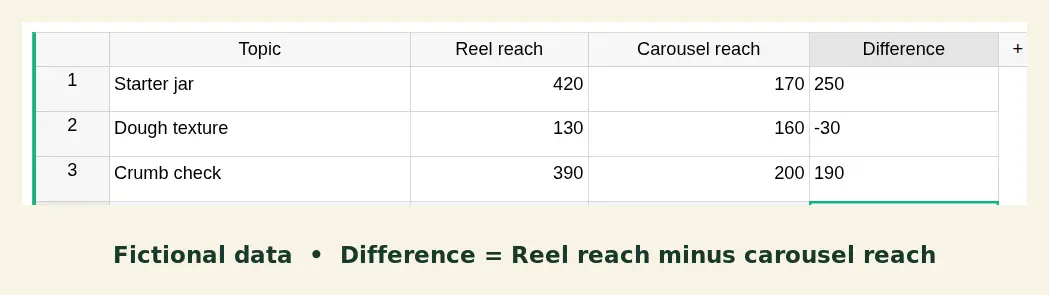
Subtract the carousel reach from the Reel reach on each row. The bakery sees a Reel lead of 250 for the starter jar and 190 for the crumb check. The dough texture carousel leads by 30. That is enough to give the next before-and-after demonstration a Reel slot and keep a carousel in the mix for material people inspect slowly. Three pairs give the bakery direction for another batch. The local audience, topics, presentation and available posting slots still shape the result.
A large difference on a single post deserves a closer look. If it came from a collaborator with a substantial audience, mark the share in the sheet and review the remaining pairs. If outcomes switch from topic to topic, plan the next batch around what people need to see. Motion can show a plant being pruned. A sequence of stills can show where to cut. Production time can break a close tie when the same person makes both posts.
Use Trial Reels for Reel ideas
If the Trial toggle appears when you publish a Reel, Meta says it initially shares that Reel mainly with people who do not follow you. Some followers can still see it through routes such as a direct share. Meta says early engagement figures generally appear after roughly a day. Trial Reels can compare two approaches to video, such as a close-up demonstration and a narrated walkthrough. Keep those results separate from the ordinary Reel and carousel pairs, which use a different distribution path.
Meta’s guide to Trial ReelsCheck who can see a trial, when its metrics appear and how to share it more widely.↗For the next batch, choose an audience question that could work in both formats. Block out the two posts and put the dates for both Insights readings on your calendar.