A sudden Google ranking drop can affect one query, one page, a group of related pages, or most of a site. Each pattern points toward a different set of possible causes. Measure the shape of the decline before changing content.
Rankings can move because search intent changed, a competitor improved, Google changed the results page, demand shifted, a technical fault appeared, or a ranking system update rolled out. Several events can also happen on the same date. Timing gives you a lead to test. It does not establish the cause.
Start with first-party performance data
Rank trackers monitor a chosen set of searches. Their readings can differ from the searches your customers see because results vary by country, device, location, and other context. Search Console records impressions and clicks from actual Google Search appearances for your property.
Open the Search results Performance report and create a focused view:
- Set the search type to Web.
- Filter for the exact query.
- Filter for the landing page that used to rank.
- Select the country you serve.
- Compare desktop and mobile separately.
- Turn on clicks, impressions, click-through rate, and average position.
Read the four metrics together.
- Clicks and impressions both fell: your page is appearing less often, and the loss is reaching real searches.
- Impressions stayed level while clicks fell: the result may have moved, the search page may have changed, or another result may now attract more attention.
- Clicks and impressions stayed steady while a tracker reports a fall: investigate the tracker's location, device, and search setup before changing the page.
- Average position moves while clicks and impressions stay steady: keep monitoring. Google describes position as an average across impressions, and that average can hide substantial variation.
Search Console omits some queries for privacy and can truncate table rows. Filter by the named query when it has enough data to appear.
Google: Performance report basicsThe official definitions for clicks, impressions, click-through rate, position, queries, pages, countries, and devices.↗Use clean comparison windows
If the drop overlaps a confirmed Google ranking update, wait until the rollout ends before drawing a conclusion. Google's guidance recommends waiting at least a full week, then comparing a period after the rollout with an equivalent period before it began. New Search Console data may also be preliminary.
Choose equal windows that exclude the rollout itself. A two-week update could use this pattern:
- Before: the two full weeks before the rollout
- After: two full weeks beginning at least seven days after the rollout ends
If the business has strong weekday patterns, compare the same weekdays. Check the same query, page, country, device, and search type in both windows.
Avoid a daily before-and-after chart that mixes the rollout with its comparison period. That chart can turn normal rollout movement into a sharp-looking story.
For example, Google's September 2026 spam update ran globally from September 24 through October 8. A site affected during that rollout would have needed to wait until at least October 15 to begin a clean post-update comparison. Use the same method for other completed updates.
Measure the scope before naming the cause
The scope of the decline narrows the list of likely explanations.
One query and one page
This pattern often points to query intent, search-result composition, a stronger competing page, or measurement differences. It can also expose a page-specific technical problem.
Several related queries on one page
Inspect the page's indexing, canonical URL, recent edits, internal links, and fit for the topic. Compare which competing pages gained across the same query group.
A group of pages
Look for a shared template, section, content type, internal-link change, canonical rule, or publishing practice.
Most of the site
Site-wide technical failures, security problems, broad policy issues, migrations, and larger ranking changes move higher on the list.
Google's traffic-drop guide uses this same progression. It tells site owners to review affected pages, inspect indexing for a group of pages, and self-assess the whole site when a large decline spans many terms.
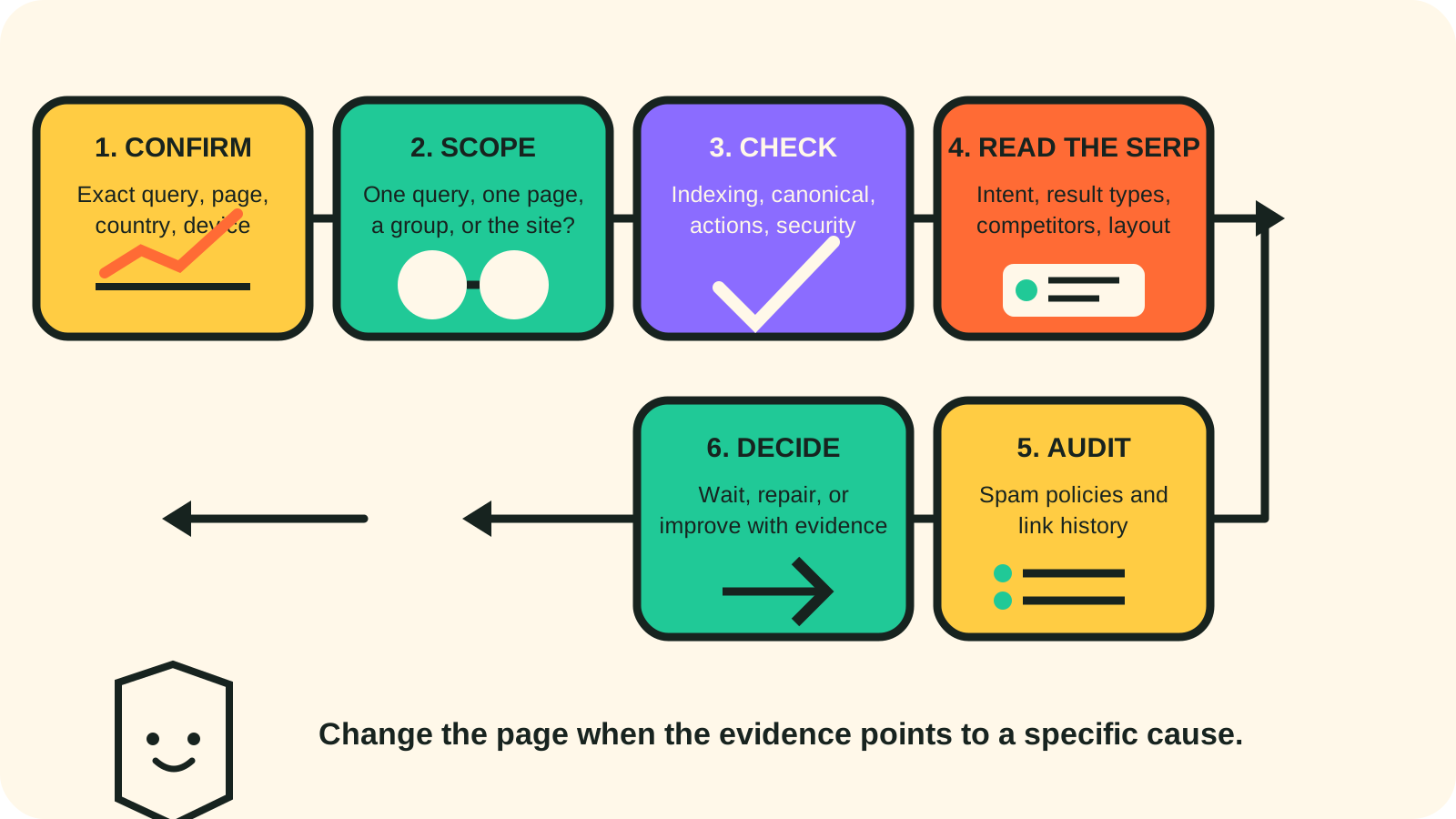
Run four page-level checks
1. Inspect the URL
Use URL Inspection for the affected page. Confirm that Google can index it, that the selected canonical is the URL you expect, and that the last crawl did not expose a new problem.
An indexed page with the expected canonical can still lose rank. This check removes several technical explanations quickly.
2. Review manual actions and security issues
A clean Manual Actions report means Google has not recorded a human-issued action for the property. Google's automated spam systems operate separately, so a clean report does not clear every possible policy concern.
Check Security Issues too. A hacked page or injected spam can change search performance before the damage is obvious on the public page.
3. Check crawl and indexing patterns
Look for a change around the first date of the decline in the Page indexing and Crawl stats reports. A server outage, blocked resource, accidental noindex, broken canonical, or failed robots.txt fetch can affect a page or section.
A technical problem may begin on the same date as an update by coincidence.
4. Review the change log
List page edits, template releases, redirects, internal-link changes, structured-data changes, and hosting incidents from the prior month. A precise timeline is faster to test than a general theory about the update.
Read the current search results as evidence
Search the query from the country and device that matter to the business. Record the top results and the page features around them.
Look for changes such as:
- a local pack taking more space
- directories or comparison pages replacing individual service businesses
- a different city, service, or audience becoming dominant
- fresh pages from established competitors
- video, image, forum, or shopping features changing the layout
- a result type that answers a different stage of the customer's task
This is a query-intent check. If Google now favors lists of providers for a query that once favored individual companies, rewriting a service page may have little effect. The response could be stronger local signals, inclusion in relevant directories, a focused comparison resource, or a clearer page for a related query.
Write down what changed. Screenshots and a dated list of results make the next comparison concrete.
Audit spam policies when the evidence points there
If the drop overlaps a spam update, a manual action appears, or the site's history includes questionable search tactics, review Google's spam policies carefully. Include practices that may come from past vendors or old campaigns.
Check for:
- paid or exchanged links intended to manipulate rankings
- doorway pages made for many near-identical locations or queries
- scaled pages created mainly to capture search visits
- copied material that adds little original value
- hidden text, cloaking, misleading redirects, or hacked content
- expired-domain or site-reputation practices that fit Google's policy definitions
Also review the site's link history. Google says a link-spam update can remove ranking benefit from links its systems discount. Removing those links later does not restore the old benefit.
A ranking drop by itself is limited evidence. Use the audit to find a concrete practice, page pattern, or link source. Do not label an ordinary ranking change as a penalty from timing alone.
Google: spam updates and your siteGoogle's explanation of automated spam systems, recovery timing, and link-spam effects.↗ Google Search spam policiesThe current policy definitions to use during the audit.↗Choose the next action from the evidence
After the clean comparison window, the evidence usually points to one of four paths.
Keep monitoring
Use this when Search Console traffic is steady, the post-update sample is still small, or the result continues to move. Save the filters and check them weekly.
Repair a technical issue
Use this when URL Inspection, indexing, crawl, canonical, security, or release history reveals a specific fault. Fix the fault, request indexing when appropriate, and annotate the date.
Improve the page for the observed intent
Use this when the query still matches the business, competing pages answer the task more completely, and the page has a clear information gap. Add documented examples, service details, coverage information, or local context that helps the searcher make a decision.
Address a policy problem
Use this when the audit finds a practice covered by Google's spam policies. Remove the practice across every affected page or link process. Google says automated systems may need months to recognize lasting compliance.
Make one change set at a time. Keep a dated record, then watch the same query, page, country, and device view so you can compare performance after the change.
Google: debug Search traffic dropsA complete first-party checklist for algorithmic changes, technical problems, security, seasonality, and site moves.↗ September 2026 spam update statusGoogle's dated record of the global rollout from September 24 through October 8, 2026.↗