
A reader can finish your guide and still struggle to take the next step. They may lack a word for the problem, miss an unstated prerequisite, or feel confident about a conclusion the evidence does not support. A question box will capture some of these gaps. Watching someone try the task can reveal others.
For marketers, this creates a practical audience-research job: find the missing knowledge between someone’s goal and their next decision. The result might be an introductory article, a worked example, a clearer product page, or a change to the product itself.
Start with a task your audience wants to complete
Choose a decision close to your subject. A camera shop might investigate how beginners choose a first workshop. A software company might explore how a small team selects a reporting method. A community organiser might study how someone decides which event to attend.
Write the goal in the audience’s language. “Choose a workshop for your first month of photography” gives someone room to show their approach. “Use our beginner filter and compare the exposure prerequisites” supplies vocabulary and a route that the person may never have discovered alone.
The Government Digital Service’s guidance on moderated usability testing describes watching people attempt tasks and asking them to explain their thinking. It recommends relevant tasks with neutral instructions that leave the route open. Marketers can adapt that method to a guide, a comparison page, an event listing, or a set of educational resources.
Decide what you want to learn before the session. For the camera shop, the question could be: “Can a beginner tell which class fits their experience, and explain what they expect to learn?” That is more specific than asking whether the website is clear.
Include people who are still learning the subject
Experienced customers have learned shortcuts and terminology. If you hear only from them, you may miss the steps a newcomer cannot yet name. Recruit people who resemble the audience you want the content to serve, including people who tried the task and stopped.
Separate the experience levels in your notes. Someone who has never bought a camera faces a different decision from a professional switching systems. Their answers can both inform the work, but combining them into one “beginner” finding hides the difference.
GDS’s participant-recruitment guidance covers defining the groups you need to learn from and reaching a range of participants. Use a short screening question about recent experience: “When did you last try to choose a photography class?” A question that tests whether someone knows your preferred terminology can exclude the people whose learning gaps you need to understand.
For an initial qualitative round, recruit a manageable mix and state who it includes. The number of people you observe does not turn a convenience sample into a market estimate. Report a pattern as something found in that round, with the task and experience level attached.
Explain what you will observe and how you will use the notes. Get permission before recording. A participant should be able to stop or skip a task. Keep contact details separate from the working notes, and remove identifying details from examples you share.
Watch the point where the task becomes uncertain
Ask the person to work through a believable task using the material they would normally consult. Allow time for them to read, search, return to earlier pages, or decide that a resource does not answer their need.
Look for specific moments: a repeated search, an unexplained choice, a return to an earlier page, a term they interpret differently, or a confident answer based on the wrong premise. A pause is a reason to investigate. It does not establish confusion on its own.
Ask a neutral follow-up close to the action: “What are you looking for here?” or “What do you expect to happen next?” After a decision, ask them to explain what led to it. Avoid naming the suspected missing concept before you hear their explanation.
GDS’s contextual-research guidance explains how familiar surroundings, usual tools, and everyday distractions can reveal barriers and workarounds. It also notes a trade-off: asking someone to explain every action changes how they do it. Choose when to interrupt, and record any help you give.
A marketer can start with a short session around one task. This is an editorial adaptation of the research method, not a claim that a brief session reveals the audience’s complete needs.
Keep the observation separate from your explanation
Use a plain document or spreadsheet with fields for the task, observation, possible explanation, and next check. Add the participant’s experience level and a reference to the relevant page or moment.
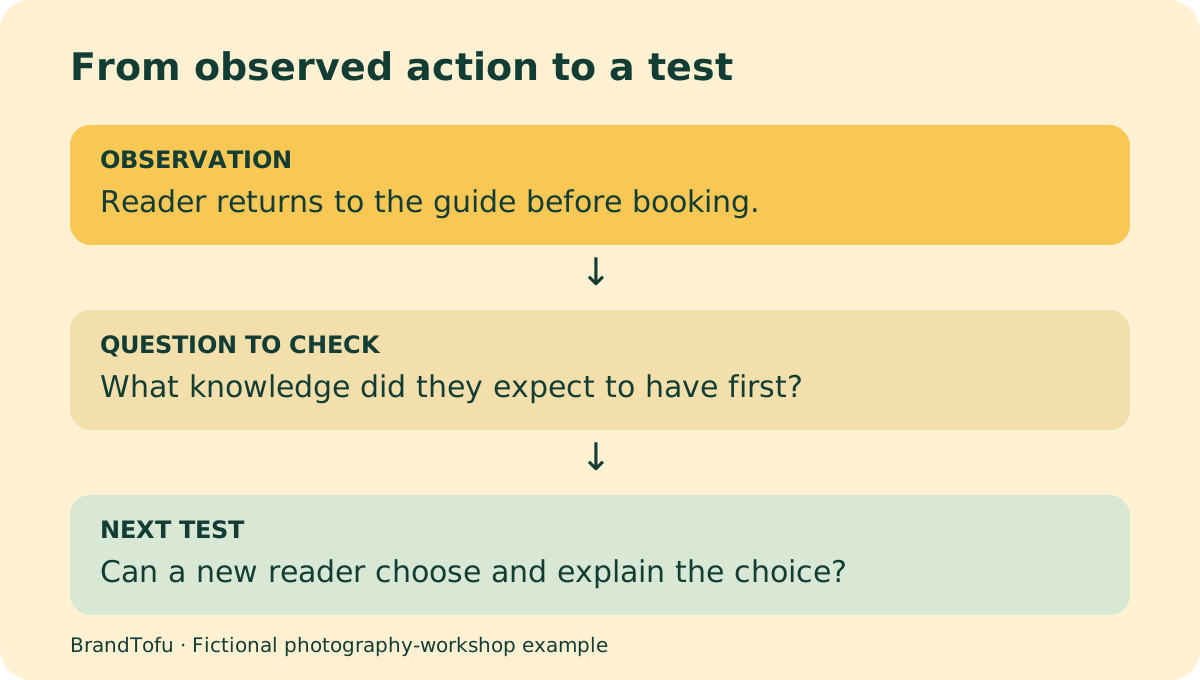
In this fictional example, a reader opens a photography-workshop booking page, returns to the guide, and searches for what they should know first. The observation is the sequence of actions. “They need an introduction to exposure” is a possible explanation that still needs checking.
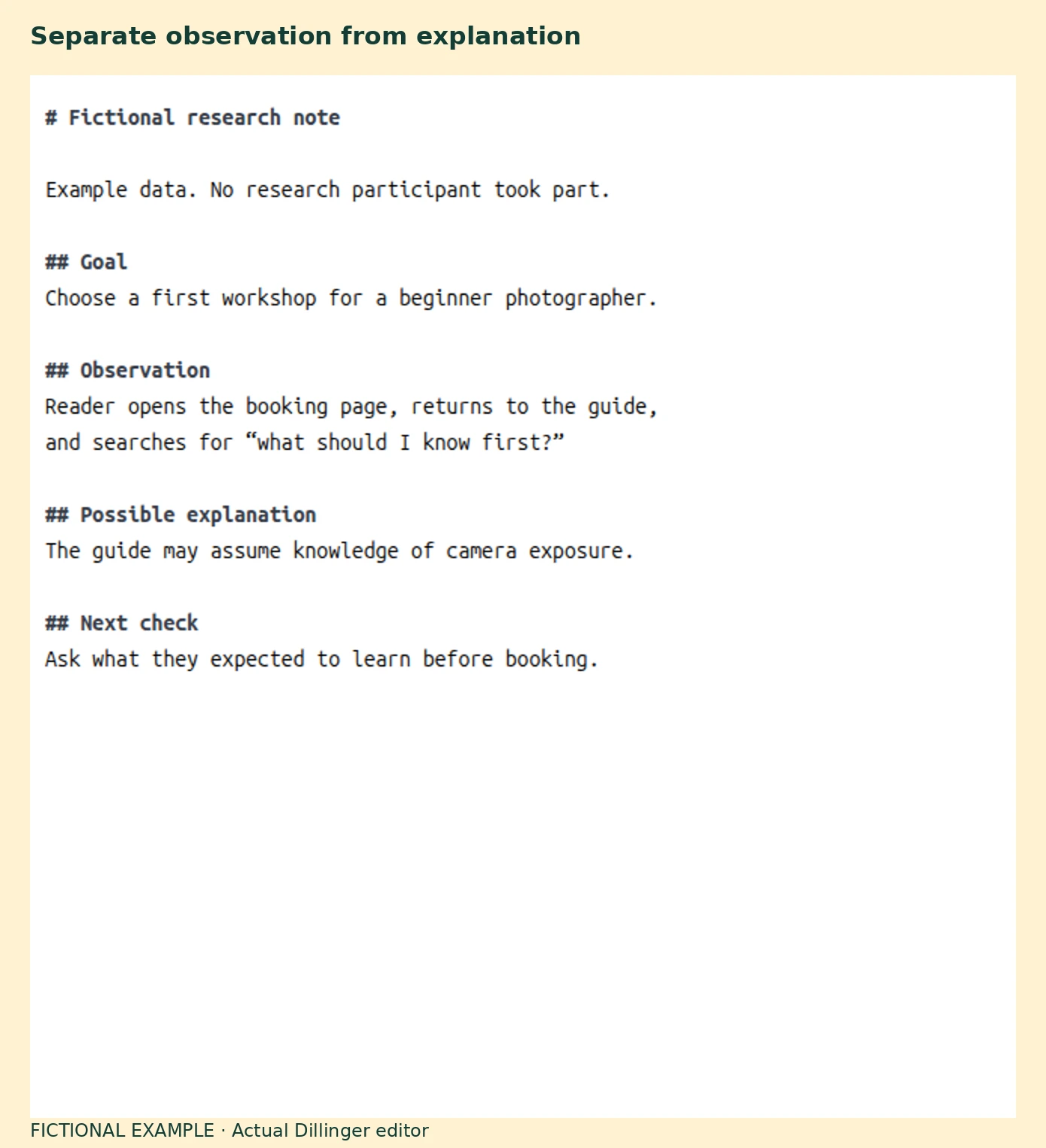
The screenshot uses Dillinger’s browser editor, checked on October 18, 2026. Its local editing and live preview were available with no account or payment. No cloud connection is needed for this example. You can use any document editor for the same note-taking process.
Preserve the person’s meaning when you summarise. Put quotation marks around their exact words only. An observer’s shorthand belongs in the observation field as a paraphrase. If you helped the person find the next step, mark the task as assisted so later readers do not mistake it for independent completion.
GDS’s analysis guidance separates recorded observations, grouped themes, findings, and actions. That distinction helps a team challenge an interpretation while preserving what happened.
Turn the gap into a question the content can answer
Translate a checked gap into a reader question with a decision attached. For example: “What should I already know before this workshop, and how can I tell?” That points to an example, a prerequisite checklist, and clear class descriptions.
Several common situations need different treatments:
- Missing vocabulary: someone describes a problem in ordinary language but cannot connect it to your specialist term. Introduce the term beside their description and show an example.
- Missing prerequisite: someone follows the steps but lacks earlier knowledge needed to make a decision. Add an introductory path and make the entry requirements visible.
- Missing interpretation: someone can produce a result but cannot explain what it supports. Show a worked result, its limits, and a decision that follows from it.
- A product obstacle: someone understands the goal but cannot find or complete the action. Share the evidence with the product or service team and test a change to the experience.
Treat these as working categories. A single task can expose several at once. For the photography example, a guide may explain exposure clearly while the booking page still hides class prerequisites. Improving both pages may serve the reader’s decision.
A software-reporting example could reveal a different gap. A person can generate a dashboard but treats a change in one week’s numbers as proof that a campaign caused it. A tutorial on where to click leaves that interpretation unresolved. An educational example can show the comparison needed, other plausible causes, and when the available evidence supports waiting for more data.
Check the gap across other evidence
Look at support questions, community discussions, on-site searches, and previous research for related behaviour. These sources can help you choose what to investigate next. They also have limits: support logs describe people who contacted support, and search terms describe people who knew enough to search.
A repeated absence of a question does not tell you whether people understood the topic. They may have left, found help elsewhere, or never recognised that a step was missing. Use those possibilities as questions for another observation round.
GDS’s discovery guidance brings together observation, interviews, existing data, support records, and earlier research to understand the wider task. For an editorial team, that means checking the route around the article as well as the article itself.
This guide began with a LinkedIn discussion by Lauren Rose Brenner about discovering what people do not know to ask. Her example concerned creator education and the judgment needed to interpret a tool’s results. The same problem appears in classes, events, services, and product comparisons: the audience can reach a step before they have the knowledge needed to use it.
Choose a small change and test the decision again
Write down the proposed change, who will make it, and what you expect someone to do differently. “Add more educational content” is too broad to evaluate. “Add a beginner example so readers can explain which workshop suits their experience” gives you an observable outcome.
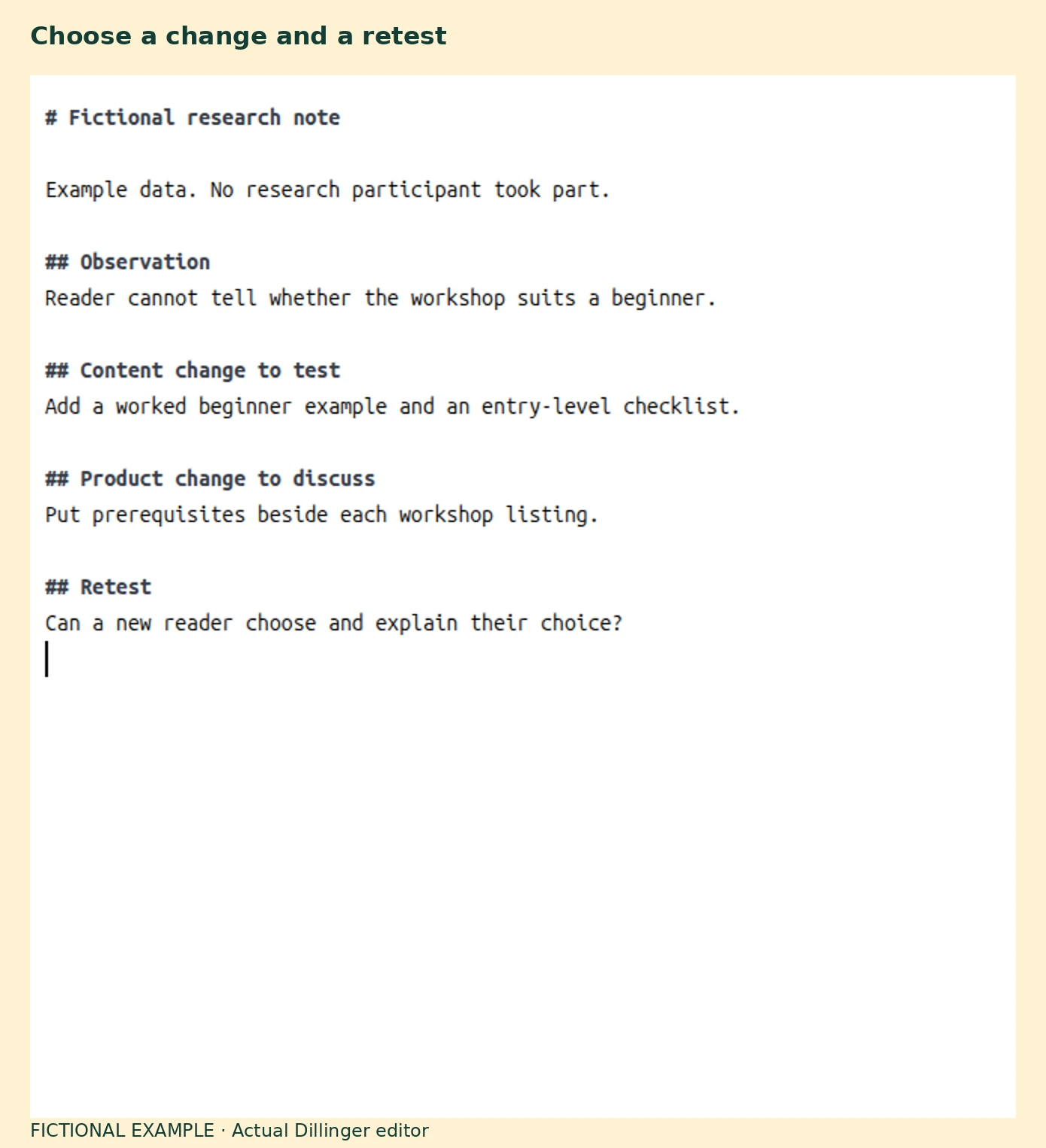
Try the revised material with people at the intended experience level. Give them the same underlying goal using neutral instructions. Record whether they complete the task independently, how they explain their choice, and where they still need help.
Measure the outcome close to the change. A reader’s ability to identify prerequisites is evidence about that learning task. It does not establish that the article increased sales or brand awareness. Those claims need their own measures and comparisons.
Keep the next action beside the finding. If readers understand the guide and still cannot judge whether a class suits them, inspect the class description and booking experience. The next improvement may belong there.