
Define who a free webinar serves, check how registrants reach it, measure live and replay viewing separately, and test a change tied to an observed barrier. A registration records interest. The attendance report tells you which people reached the session, with the limits of your platform's tracking.
Charging a fee changes the offer and the people willing or able to register. A higher attendance percentage after that change can accompany a smaller audience. Evaluate the number of people reached, their experience, access, and production cost alongside the percentage.
Define the session's job
Choose a learning task someone can complete after the webinar. A bookshop might teach readers how to start a neighborhood book club. A software company might teach a first report. A community organization might explain how to use a local service. Each gives the invitation a subject and gives the organizer something to review afterward.
State the audience, the lesson, the date and time zone, the length, and what joining requires. Say whether a replay will be available and when. If a live exercise or discussion is part of the offer, explain that too. Readers can then decide whether to reserve the time or use the recording.
This question arose in a LinkedIn discussion about attendance at free educational webinars. The organizer described a gap between registrations and live attendance and asked how to encourage commitment while preserving access. That is an event-design and measurement problem shared by many learning programs. The examples below are fictional and do not describe the organizer's audience or results.
Count the people and the viewing window
Set the reporting window before comparing sessions. For example: registrations at the live start, live attendance during the session, and replay viewing during the following seven days. Record late registrations separately if people can still sign up for the replay. This keeps the denominator, the group you divide by, consistent with the question.
Keep these measures distinct:
- Live attendance rate: unique registered people who joined live divided by the corresponding registrants.
- Replay viewers: unique people who watched the recording in the stated window. Separate people already in the registration group from later viewers when the data permits.
- Total unique viewers: people who watched either format, counting someone who used both once.
- Learning evidence: a completed exercise, a question about applying the lesson, or another observation tied to the task. Joining a room alone does not establish learning.
In our fictional example, 300 people register before the session. Of those people, 100 join live and 70 watch the replay within seven days. Twenty do both. The live attendance rate is 100 / 300 × 100 = 33.3%. Total unique viewers are 100 + 70 - 20 = 150, giving a seven-day reach of 150 / 300 × 100 = 50% within that original registration group.
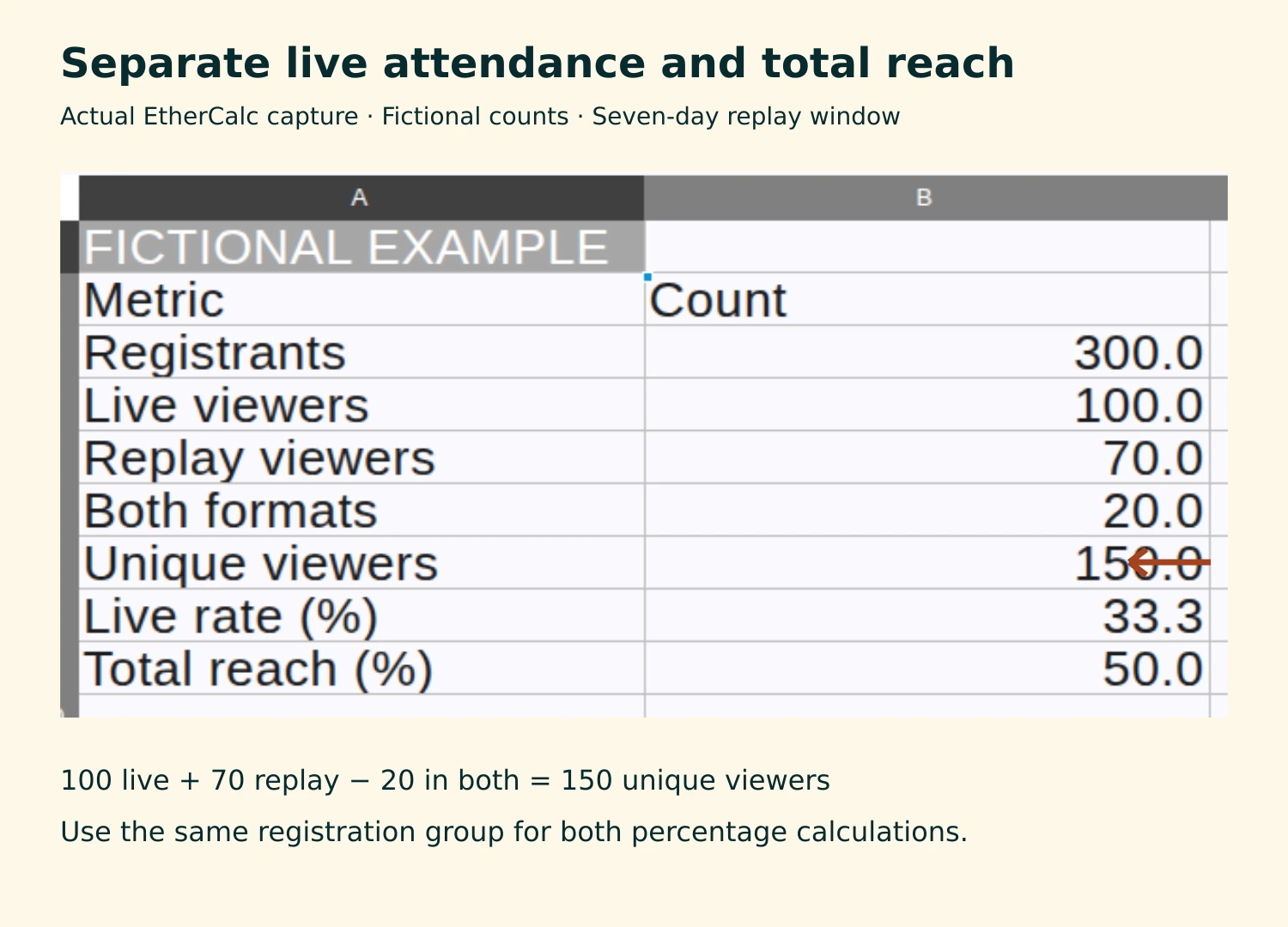
Use a stable person identifier from the permitted report to remove duplicates. A rejoin can create several rows for one person. Public replay view counts may include repeat views or people outside the registration group. When you cannot match identities, report live attendees and replay views separately and label the limits. Keep the identifiable records inside the team; share aggregate counts in public reports.
Read benchmarks with their definitions
Livestorm's 2026 benchmark report reports a 47.7% average live show-up rate for its 2025 platform data. Its dataset covers 33,786 sessions from 3,199 organizations and excludes internal events, test events, sessions with fewer than ten registrants, and sessions shorter than fifteen minutes. That describes a particular platform population. It does not set an attendance target for every community workshop, class, or product lesson.
Compare your own sessions with similar audiences, subjects, promotion, and reporting windows. Record changes in those conditions. An aggregate benchmark cannot tell you why an individual registrant missed your event.
Check the joining path before changing the price
Run the public registration and joining path yourself using an address you control. Check the confirmation email, displayed time zone, calendar entry, joining link, and mobile experience. Follow the same route a new registrant will use. A correct event page can coexist with an outdated reminder or an inaccessible handout.
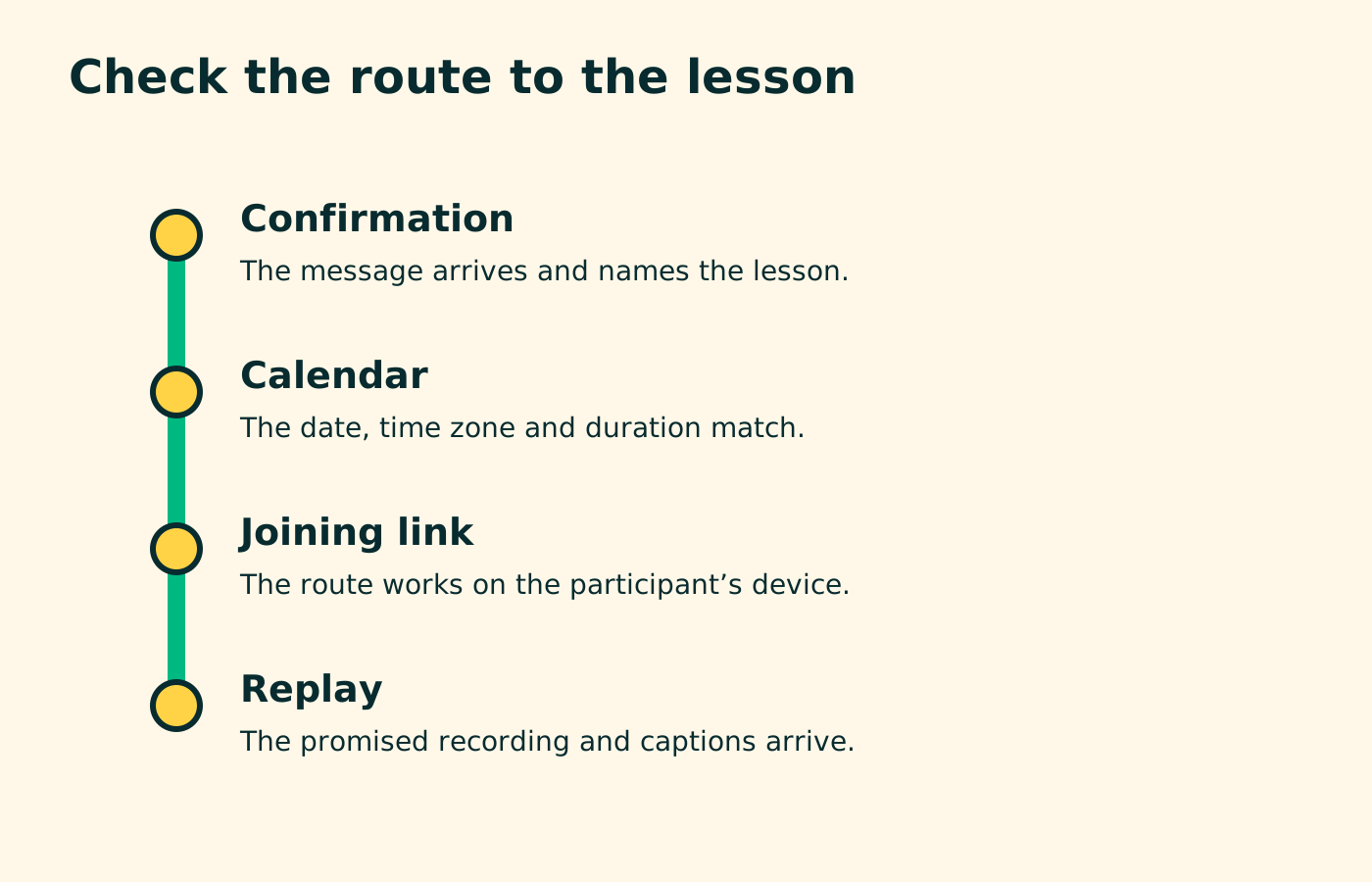
Ask a few willing non-attendees what happened. A short optional question can offer “time no longer worked,” “could not find or use the link,” “planned to watch the replay,” and a space for another reason. Let people skip it. Responses are clues from the people who replied, so record their number and avoid generalizing them to everyone absent.
Different observations call for different changes. A missing link calls for a delivery check. Time-zone confusion calls for clearer dates and calendar information. People who expected a replay may already be using the program as offered. A vague title calls for a more specific lesson and intended audience.
Make reminders support a decision
Send the confirmation promptly and make the joining route easy to find. For a small first test, an organizer could choose one reminder the day before and one shortly before the start. Those times are a proposed test schedule. Check what your tool supports and consider what the audience has agreed to receive.
Each message should state the session, localizable time, joining route, length, and promised lesson. Include preparation only when participants need it. Provide a way to cancel or say they will use the replay, if your setup supports that choice. Avoid language that blames people for changes in their availability.
For a fictional book-club workshop, the reminder could read:
Your book-club planning workshop starts tomorrow at 6 p.m. Pacific Time and runs for 40 minutes. Bring one book you might choose for a first meeting. The joining link is below. We will send the recording within two days to registered participants.
Only promise that delivery schedule when the team can meet it. Test the actual links before sending.
Zoom's webinar email documentation distinguishes registration confirmations, reminders, attendee follow-ups, and absentee follow-ups. It describes customizing reminder timing and requires a Zoom Webinars add-on for this feature. The documentation is a reference for an existing Zoom setup; the worked example here uses a public spreadsheet and does not require a webinar software purchase.
Preserve access in the live session and replay
Check access while planning the session: captions, readable materials, a way to request accommodations, and instructions people can follow on their device. Send materials ahead when participants or captioners need them. Review the replay's captions before releasing it and keep accessibility features with the recording.
The W3C WAI event checklist covers these planning decisions for remote, in-person, and hybrid events. Its guidance helps organizers inspect barriers that an attendance percentage cannot reveal.
A replay can serve people whose working hours, caring responsibilities, connection, or other circumstances prevent live attendance. Record it as a separate way to reach the lesson. For a discussion involving personal disclosures, agree on recording scope in advance; the public teaching section and private discussion may need different treatment.
Evaluate a fee as a change to the offer
A fee can support the cost of a session, reserve limited capacity, or pay for feedback and materials. State that purpose and decide how access will work. Options include sponsored places, a free learning session with a separate paid workshop, or a free recording. Choose terms the team can explain and administer.
Do not infer that a fee improves commitment from a higher attendance rate alone. Consider this second fictional scenario: a free session attracts 300 registrants and 100 live attendees, while a paid session attracts 100 registrants and 70 live attendees. The live rate rises from 33.3% to 70%, while the live audience falls from 100 to 70. These invented counts show why both measures belong in the report. They are not evidence for the effect of charging.
Two successive events also differ in topic, audience, date, speakers, and promotion. Any of those could influence the result. A causal claim about price needs a comparison designed to isolate that change, with enough observations to interpret it. A small organizer can still make a local operating decision, provided the report names the differences and uncertainty.
For an access-led program, try the joining-path and reminder checks first when the evidence points to those barriers. If costs require a paid offer, describe the financial reason directly and track who can still participate. Refundable deposits also create payment, refund, and administration work; include that work in the decision.
Run one change and record the next decision
Write a short test record before the next event: the observed barrier, proposed change, owner, dates, measures, and condition for keeping or revising it. For the fictional bookshop, the record might say: “Several respondents could not find the joining link. Test a shorter reminder with the link near the start. Keep the lesson and time stable where possible. Check link delivery, live headcount, seven-day unique reach, attendee questions, and staff time.”
After the session, record what happened and any other conditions that changed. If live attendance improves while total unique reach stays steady, the change may have shifted when people watched. If both rise, inspect audience fit and learning evidence before expanding the program. If the access problem persists, revise the joining route and test it with participants before scheduling the next session.
Livestorm's 2026 webinar benchmarksRead the platform dataset and exclusions before comparing a live attendance rate.↗ Zoom webinar email settingsCheck the confirmation, reminder, and follow-up controls in a licensed Zoom Webinars setup.↗ W3C WAI accessible event checklistPlan materials, captions, participant access, and recordings alongside the event schedule.↗