A service page can help someone discover your business while they are still learning what they need. A homeowner might search for signs that a chair needs repair. A designer might look for a way to convert an image. Each person needs a page that explains the task and makes the next step clear.
When that page stays out of Google's index, begin with three questions: can Google reach it, can Google read its content, and does the page answer a visitor's question or let them complete a task? The index is Google's collection of processed pages that may appear in search results. Crawling is the earlier step in which Google fetches a page.
The checks below reflect Google's documentation reviewed on October 11, 2026. Indexing and rankings remain Google's decisions.
Read the indexing status precisely
Google Search Console is Google's free site-performance and diagnostics service. Its Page indexing report groups URLs by their current recorded status. Use URL Inspection to investigate an individual page.
Two similar labels describe different stages:
- Discovered, currently not indexed: Google knows the URL and has not crawled it yet. Google's documentation describes a deferred crawl, often associated with avoiding server overload.
- Crawled, currently not indexed: Google fetched the page and has not included it in the index. It may be indexed later, and the documentation says resubmitting it for crawling is unnecessary.
The first label alone does not establish that Google rejected AI-written prose. The second label alone does not diagnose a content defect. Treat either as a recorded state to investigate. Check the individual URL and the report's dates before choosing a repair.
Google: Page indexing reportUse the exact status definitions to distinguish discovery, crawling, duplication, and indexing problems.↗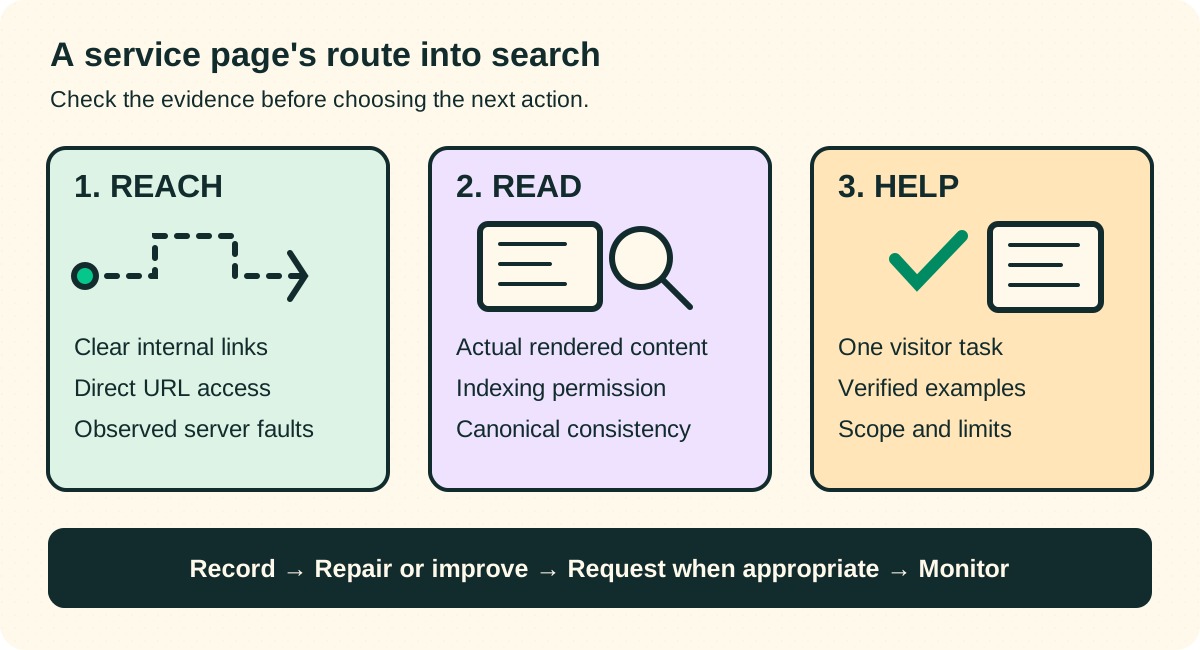
Check 1: make the important URL reachable
Choose a page that serves an actual customer need. Write its intended job in one sentence: “This page helps a homeowner understand chair-restoration options” or “This page converts a PNG image to WebP and explains the tradeoffs.”
Start from the homepage or a service overview and follow the route a visitor would take. Can you reach that exact page? Does the link describe its destination? Can someone open the address directly in a new browser session?
Ask your developer to check that the navigation uses ordinary links with an HTML a element and an href address. A button that changes the screen through JavaScript can behave differently from a crawlable link. Google's link guidance explains the supported markup and recommends descriptive link text.
For example, a tools overview can link to “Convert PNG images to WebP.” That tells the visitor what the page does and gives the crawler a concrete address. Put the link where someone comparing tools would expect to find it.
Google: crawlable linksThe code examples help a developer check whether navigation exposes real page addresses.↗Then inspect the chosen URL in Search Console. Record any access problem it reports. Check server errors, accidental login requirements, firewall challenges, redirects, and robots.txt rules with the person who runs the site. Robots.txt is the file that gives crawlers instructions about access.
A reported server fault calls for an access repair. A page that is still waiting for a crawl calls for further checks and observation. Keep the specific evidence beside the proposed action.
Check 2: inspect the page Google can read
In URL Inspection, first record Google's stored information. Then run Test live URL to examine access now. Open the tested page's HTML and screenshot when available. A successful live test confirms access for the inspection tool; it cannot guarantee inclusion in the index.
Check that the tested page contains the actual service description, meaningful examples, and links. Also review indexing permission and canonical details in the appropriate report. A noindex instruction asks search engines to exclude a page. A canonical URL is the preferred address for a set of duplicate or very similar pages.
The live test does not determine Google's eventual canonical choice or test every indexing condition. Keep its result alongside the stored inspection result, so an access pass does not become a claim that indexing is assured.
Google: URL InspectionThis explains what the stored report and live test can each establish, including their limits.↗JavaScript and prerendered pages
JavaScript sites can make content appear after the browser loads the initial page. Google processes these pages through crawling, rendering, and indexing. Rendering means running the page's code to build what a visitor sees. Server rendering or prerendering puts the page's content into the initial HTML response and can improve access for users and crawlers.
Check a few service routes directly. A homepage that looks complete does not establish that every route returns its own content. Compare the initial response and the tested render. Ask whether each route shows the correct heading, service description, links, and page address.
A developer ticket can describe the observed fault: “The image-conversion route opens directly, but the tested HTML contains the homepage title and description. Please make the route return its service content and review its metadata.” That gives the developer an observed problem to reproduce.
Google: JavaScript SEO basicsUse this to check the crawl, render, and index sequence for an interactive website.↗Keep URL signals consistent
If several addresses show the same service, decide which is the preferred URL. Review redirects, canonical annotations, sitemap entries, and internal links for agreement. Google treats these as signals when choosing a canonical; Google may choose a different URL from the one you prefer.
For example, a converter might be accessible through a service route and a tracking-parameter variation. Point the site navigation to the preferred service address. A different service should have content that explains its own task.
Google: canonical URL guidanceThis explains how duplicate-page signals work and how to avoid conflicting preferences.↗Check 3: explain the service and its limits
Once you have inspected access and readable content, review the experience as a visitor. What can someone learn or do here? What evidence makes the explanation credible? Which questions still send them elsewhere?
Google's helpful-content guidance asks creators to assess originality, completeness, accuracy, and whether the audience can accomplish its goal. It also says Google has no preferred word count. Use those questions to review your page, and ask someone unfamiliar with the service to try it.
Review the page with these questions:
- Task: Who is this service for, and what problem does it solve?
- Example: Can a visitor see a representative input, process, or output?
- Scope: What does the service include, and what are its limits?
- Decision: What information helps someone choose a suitable next step?
- Evidence: Which details can the business verify through its actual work?
These prompts form our editorial review process. Google does not publish them as a ranking formula.
A software or file-conversion tool
An image-conversion page can demonstrate a conversion using an owned sample image. Explain supported formats, size limits, output options, and whether the conversion changes image quality. Describe what happens to uploaded files according to the tool's actual behavior and privacy policy.
Let someone test a sample and understand the result. A row of generic benefit cards gives you room to add these task-specific details. Verify every claim with the product owner before publishing it.
A professional or repair service
A chair-restoration page can explain which damage the workshop handles, what the assessment involves, and how the customer prepares an enquiry. Show an owned process photo or a documented example with permission. Describe what affects an estimate and which details the team needs to assess the work.
A furniture-cleaning page may use the same design while teaching a different process, material limitations, and preparation steps. The layout can stay consistent as each page explains its service.
A location-specific service
A local page can explain actual coverage, access arrangements, availability, and relevant local constraints. A broadband comparison page might show verified building-specific availability and the date the information was checked. A repair business might explain collection routes or the area served.
Use details the business can support. If visitors must go to another location's page to find the service details, review what the first page contributes. Google's doorway policy describes risks around substantially similar pages created to capture related searches and funnel visitors onward.
Google: helpful content questionsA source for reviewing originality, audience usefulness, and completeness.↗Decide what an AI-assisted rewrite should change
A recent public service-page question illustrates the uncertainty. The site owner had a homepage indexed, several service routes waiting for a crawl, and pages built around a tool, text cards, and FAQs. They asked whether deeper human-written content would help.
A rewrite can add verified information about each service, such as supported inputs, output examples, and file-handling details. The indexing label cannot establish that changing the authoring method will solve the problem.
Google's current generative-AI guidance describes roles such as research and structure, and calls for accuracy and review. It warns that generating many pages with little added user value may violate scaled-content policy. Review the finished page, its claims, and its purpose. Keep original examples and the product's real capabilities central to the work.
Before rewriting a whole site, choose one service page whose missing information you can name. For an image converter, that might be supported inputs, an output example, and an accurate file-handling explanation. Test that page with a new user and record where they hesitate.
Google: generative AI content guidanceThe current guidance helps separate an authoring tool from the accuracy and value of the finished page.↗Run a small, documented improvement
Keep the existing address unless a specific technical reason requires changing it. A new slug adds another variable to the investigation. Use this sequence:
- Record the URL, intended job, current inspection status, report date, and last crawl if one is shown.
- Fix any observed access, indexing-permission, or route-rendering fault.
- Add the missing task-specific information and verify its accuracy.
- Check the live page and its route from the service overview.
- Log the change, including what was repaired and what content was added.
- Use URL Inspection to request indexing for a small number of new or updated pages. Use a sitemap for a larger set.
- Review the same URLs over time and record crawling, canonical selection, and indexing separately.
Google says crawling can take days to weeks. A request cannot guarantee inclusion, and repeating a request for the same URL will not make crawling faster. Set a recurring review point appropriate to the site's pace; a weekly check is a practical starting habit. Google sets no indexing deadline for that check.
When several things change together, an eventual indexing change cannot show which one caused it. Your log still helps you understand what was released and gives a developer or SEO specialist a record of the changes for the next review.
Google: request a recrawlThe official guidance explains submission methods, expected variability, and why repeated requests do not accelerate crawling.↗