
A product facts library gives people a shared place to check what a product is, what you can say about it, and which version of that information applies. Keep the product identifier, variant, evidence, review state and owner beside each fact. Then connect approved facts to the pages, images and campaigns that use them.
A creative team can turn the same product into a launch page, a retailer sheet, a social video and a sales presentation. Each format needs different copy. The capacity, ingredients, dimensions and supported claims still need to agree. When those details live in copied slide decks, a change can reach some people while others keep using an older file.
The Harbor cup examples are fictional teaching data. Documentation was checked on November 21, 2026. A marketer’s question about maintaining product fact sheets prompted the guide; the process applies to physical products, software plans and service offers.
Define the record people need to find
Start with a product people are currently promoting. Ask a writer, designer and product reviewer to find the same details using the team's current files. Observe where they search, which version they choose and what they still have to ask someone. Their answers show which fields and views your first library needs.
Give each product a stable internal identifier. Record a variant separately when its facts differ: size, colour, flavour, pack count, market or another choice customers can buy. Keep identifiers as text, including leading zeros. A product name can change while the internal record remains traceable.
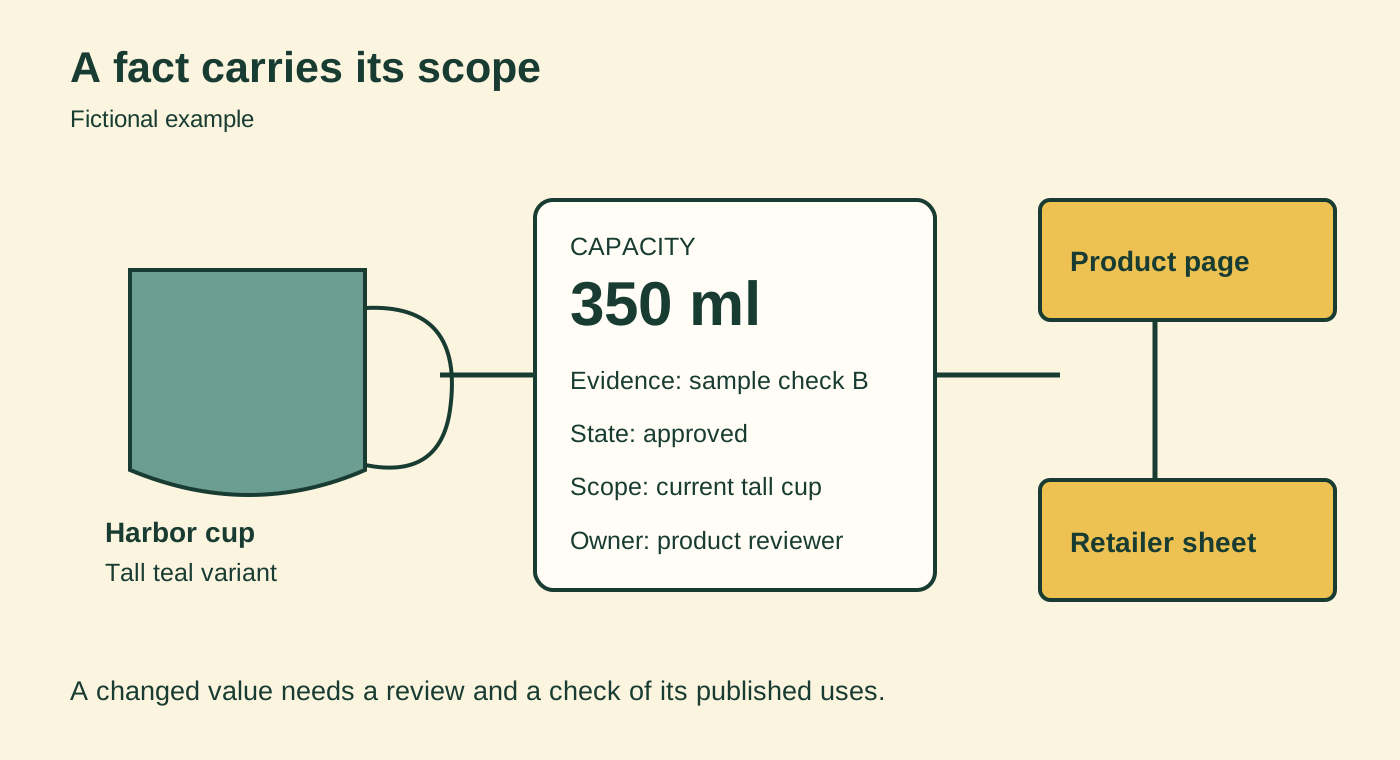
For a fictional Harbor cup, the short mustard variant holds 250 ml and the tall teal variant holds 350 ml. The range shares a ceramic material. Those details need different scopes. A range-level material fact can apply to both cups; a capacity fact belongs to the named variant. A photograph of the tall cup also needs that association.
GS1 US's product-data guidance distinguishes a functional product description used with trading partners from marketing copy used with shoppers. It also treats net content and units explicitly. That distinction helps explain why the data record and a campaign headline serve different jobs. This article does not assign or change product barcodes.
Write down what each field means. Decide whether “capacity” is a stated usable amount or another measurement, and record its unit and source. Keep “unknown,” “not applicable” and an empty unfinished field distinguishable. A blank can otherwise look like permission to guess.
Separate facts, approved wording and assets
Build the first library around the information the team needs to check. A shared table can hold a small initial set. Use linked records when repeating product details across rows becomes difficult to maintain.
Keep these kinds of information connected:
- Product and variant: stable identifier, current name, variant and applicable market or version.
- Fact: attribute, value, unit, source evidence and the circumstances in which it applies.
- Approved wording: exact claim or message, permitted scope, reviewer, review date and approval state.
- Asset: image or document link, product association, usage permission and current version.
- Published use: destination URL or file, responsible person and the fact or claim it depends on.
A claim such as “dishwasher safe” needs its own supporting evidence and review. A complete product description does not establish that claim. For the fictional cups, keep the wording pending while the evidence is missing. A product reviewer can decide what testing or documentation is needed for the actual product and intended use.
GS1's Data Quality Framework overview connects data management with process checks and physical validation of product attributes. Use it to examine how your team establishes facts. A tidy table alone cannot verify what a sample actually contains or how it performs.
For software, replace cup capacity with the relevant plan, release and account conditions. An export feature available on a paid plan should carry that scope beside the approved sentence. For a service, record the deliverable, exclusions, location and preparation the customer must provide. Avoid copying a promise across offers merely because their names are similar.
Give changes a review path
Assign a person who can verify each type of information. Product staff may own specifications; a brand lead may own approved wording; the person responsible for a particular market may review its local version. Name the actual owner in the record. “Marketing” can leave several people assuming someone else has checked it.
Use states that describe the work remaining. For example, proposed, awaiting evidence, approved and retired. Define who can move information between them. In a basic table, those labels may be conventions people can overwrite. A system with permission controls and approval workflows can enforce more of the process, depending on its configuration and plan.
A change request should identify the old value, proposed value, reason, evidence, affected variant and intended start date. Keep the currently approved fact available until its replacement takes effect, unless the old information is wrong and needs immediate correction. Label future information so it cannot be mistaken for a current specification.
Suppose a draft package says the tall cup holds 400 ml. The current sample record says 350 ml. The reviewer needs to establish whether the package is wrong, the sample has changed, or the figures describe different measurements. Changing the table to match the latest-looking file would leave that question unresolved.
Once the reviewer approves a change, check the published uses attached to that record. A product page, retailer sheet and creator brief may all need updates. Record each destination's completed check. The existing BrandTofu guide to keeping product marketing content current develops that publication-repair step.
Version history helps explain what changed in a file. It does not establish that a product reviewer approved the change. Google's version-history documentation describes earlier versions, named versions and cell edit history, including limits on which changes appear. Keep the decision and its evidence in explicit fields even when the tool provides an edit log.
Work through a small example
Our recorded demonstration opens a fictional CSV in Grist's browser CSV editor. CSV means comma-separated values, a plain-text table format. The editor provides a real grid for examining and editing the example. Its page describes it as free and says the data stays in the browser. We verified that this example opens with no signup or payment.
This temporary editor demonstrates the record structure. It does not provide a configured team approval process or a durable shared library. Save your example separately and choose a shared system when other people need access.
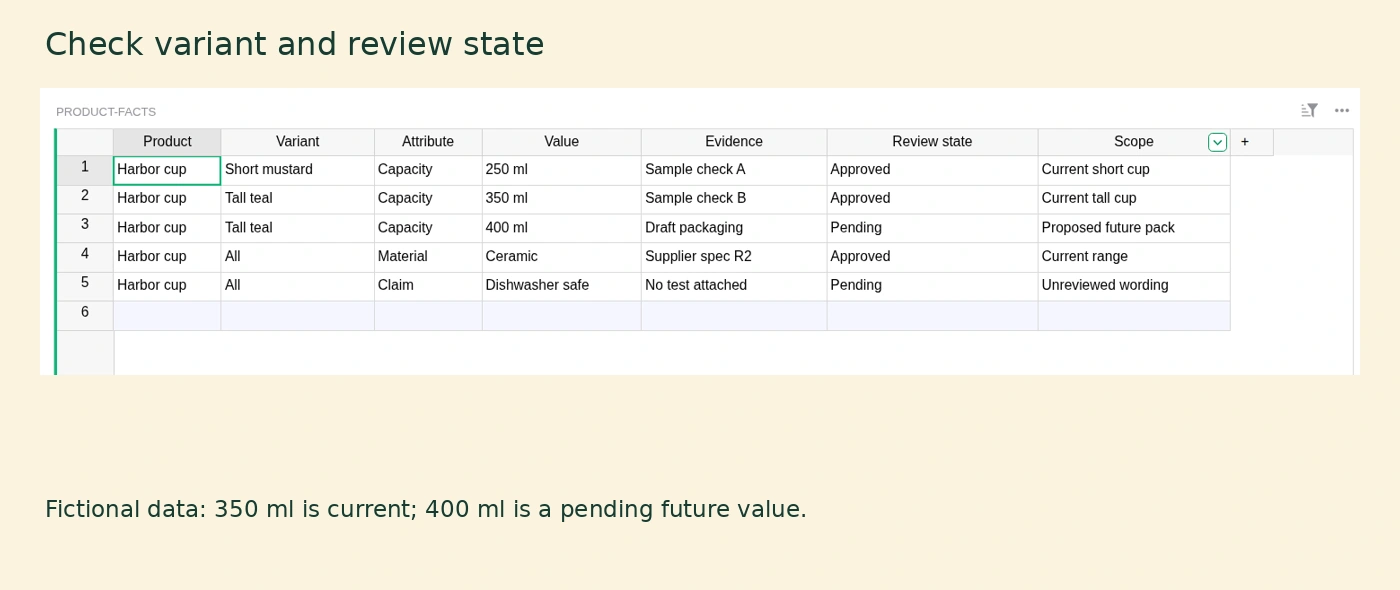
Find the tall teal cup's capacity. There are two values: an approved 350 ml record tied to a sample check and a pending 400 ml record tied to draft packaging. Read the scope beside each. The pending value concerns a proposed future pack. It is not a replacement instruction for current marketing copy.
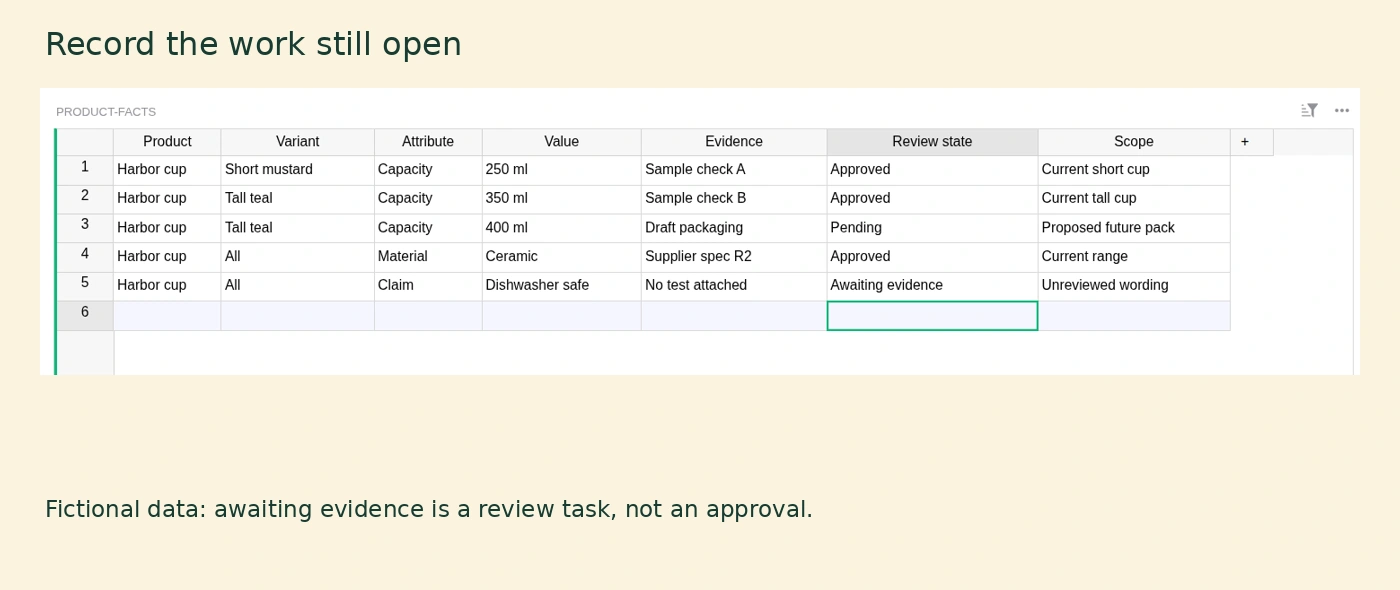
Then inspect the dishwasher claim. Its evidence field says that no test is attached. Change its review state to “Awaiting evidence” so the next person can see the remaining task. That edit records a question for review; it does not validate the claim.
Before moving a real product into this structure, ask a colleague to repeat the task: find the current fact for the correct variant, open its supporting source and identify who can approve a replacement. Record the point where they hesitate. Revise the field names or view around that observed problem.
Match the system to the work
Choose the system by testing your records and review steps in it. The number of products alone leaves out variant complexity, languages, approval needs and the destinations you must keep current.
A shared spreadsheet or list can fit a small library when people can maintain the fields, manage access and follow a defined review convention. A database-style workspace can connect products, claims, assets and published uses as separate records. Test whether a writer can find approved material through a simple view while the reviewers retain the detail they need.
A product information management system, often shortened to PIM, organizes structured product data. For example, Akeneo's documentation describes families of attributes and variant structures. Requirements and available features vary by package. A digital asset management system, or DAM, addresses the management of media files; check how a candidate connects those files to the product records you maintain.
Give every candidate the same trial. Add the two cup variants, a shared material fact, a pending claim and a proposed future change. Ask it to show the approved current information, preserve the reason for a change, restrict the relevant editing actions and export the records in a usable format. Include a photograph and inspect whether it stays linked to the correct variant.
If retailer feeds, translations or several markets create repeated manual work, include an actual example of that handoff in the trial. Check the complete cost with the people, access levels, storage, integrations and administration your team will need. A polished product screen cannot establish that the configured system handles your review process.
Start with the product you tested and the colleagues who maintain it. Retire superseded working copies, point readers to the shared record, and keep a named owner responsible for the next change.